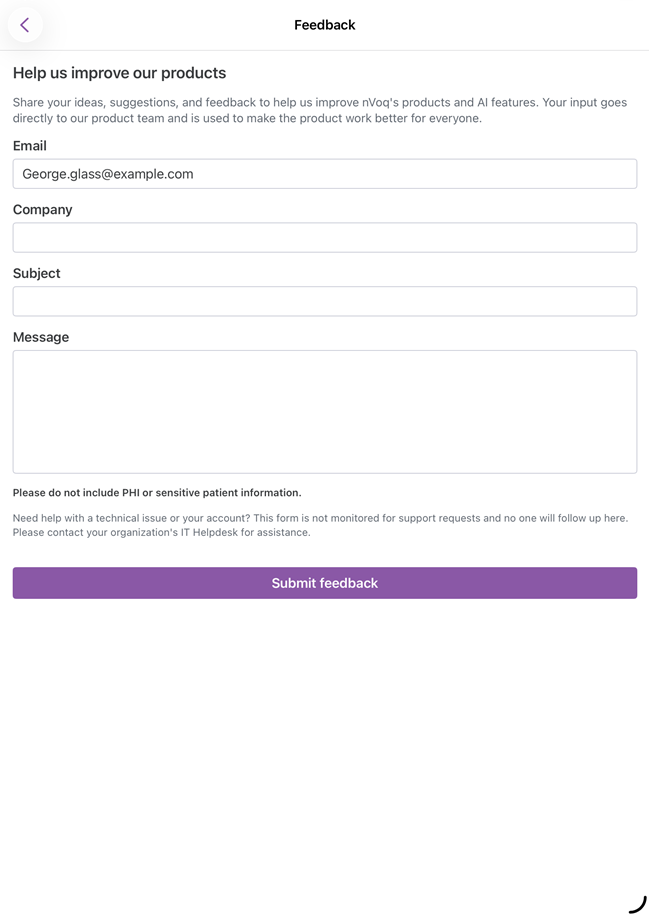
Send Product Feedback
Use the Feedback screen to share ideas, suggestions, or comments about nVoq products and AI features directly with the nVoq product team.
The Feedback form is intended for product feedback only.
If you need help with a technical issue or your account, contact your organization's IT Helpdesk. Do not include protected health information (PHI) or other sensitive patient information in your feedback.
Submit Feedback
Tap the menu icon
 on the dictation or Voice Assistant screen to bring up the quick access menu, then tap Feedback.
Review the pre-filled Email address. If necessary, update it.
Enter your:
Company
Subject
Message
All fields are required.
Tap Submit Feedback.
If your feedback is submitted successfully, a confirmation message is displayed.
If your device is offline or the feedback cannot be sent, an error message is displayed asking you to check your internet connection and try again.